Tenant screening is one of the most important parts of the rental process, but that doesn’t mean it should be time-consuming or complicated. Thanks to online tenant screening services like Landlord Studio, it’s never been easier to run a full tenant screening report that includes a credit check, background check, criminal history, and eviction records.
In this guide, we’ll walk you through the exact steps to run a tenant background check online using Landlord Studio, explain why tenant consent is required, and help you understand your options.
Why Run a Tenant Screening Report?
Before handing over the keys to your rental, it’s essential to know who you're renting to. A screening report helps you:
Verify the tenant’s financial reliability
Uncover any history of missed rent or evictions
Flag potential red flags in their criminal record
Make an informed decision backed by data
💡 Pro Tip:Running background checks also demonstrates due diligence, which can help protect you in future legal disputes.
Step-by-Step: How to Screen a Tenant Online with Landlord Studio
Landlord Studio is fully integrated with TransUnion SmartMove, one of the most trusted names in tenant screening. Here’s how to use it:
Step 1: Create a Free Landlord Studio Account
Visit landlordstudio.com and sign up for a free account. Once you're in, navigate to the “Screening & Applicants” tab in the left hand menu.
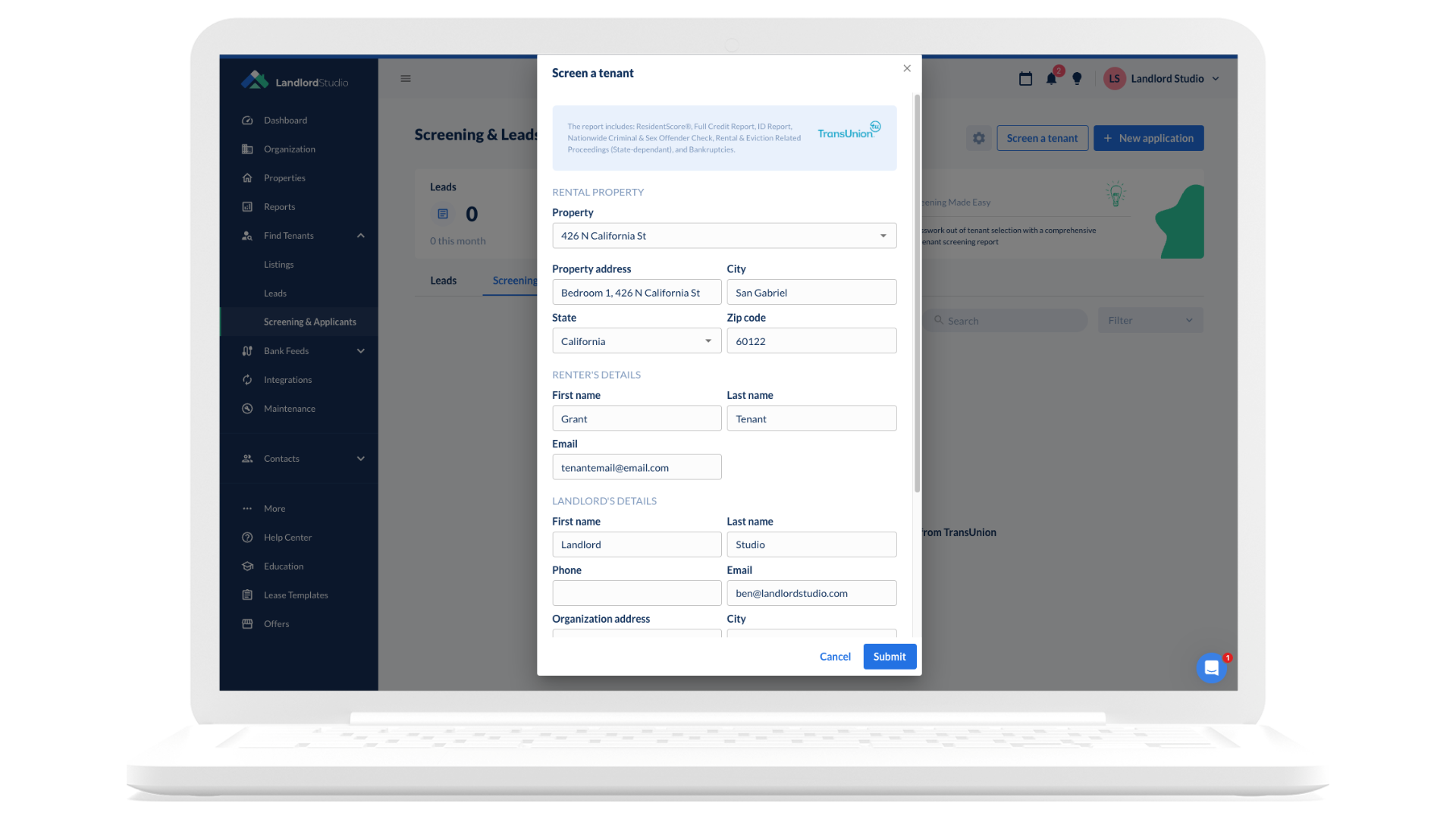
Step 2: Start a New Screening Request
Click on “Screen a tenant” or “+ New application”.
Choose whether to start from a lead collected through our rental listing feature or enter a new tenant directly. Select the property this screening report is for, and then you’ll be prompted to enter:
The applicant’s full name
Email address
Step 3: The Tenant Provides Consent
To comply with the Fair Credit Reporting Act (FCRA), all screening reports require the applicant’s explicit consent. Landlord Studio automates this for you.
Once the screening report is initiated, an email is sent to the applicant, who then verifies their identity, fills out the report details, and authorizes the report.
No need to collect sensitive information yourself — no Social Security numbers, no paperwork.
Step 4: Review the Report
Once the applicant completes their section, the report is generated instantly. You’ll receive:
Credit score (ResidentScore)
Credit history (tradelines, collections, inquiries)
The FCRA and similar state-level laws protect consumer privacy. You can’t legally run a background or credit check without a tenant’s written authorization.
Using Landlord Studio ensures full legal compliance by:
Handling tenant identity verification
Securing electronic consent
Keeping your records safe and private
Free vs Paid Tenant Screening Services
You might be tempted to search for a free option, but “free” background checks often lack the data integrity, legality, and depth of information required for a responsible rental decision.
Option
Free Tools
Landlord Studio + SmartMove
Legal Compliance
Not guaranteed
Fully FCRA compliant
Credit Score
Usually not included
ResidentScore by TransUnion
Criminal Check
Limited sources
200M+ records searched
Eviction History
Rarely included
National records
Consent Workflow
Manual
Automated
Cost
$0
Paid by tenant or landlord (your choice)
Why Use Landlord Studio for Tenant Screening?
Tenant screening isn’t just a box to tick — it’s how you protect your rental income and avoid costly evictions. Landlord Studio gives you a professional-grade process without the headaches:
One platform, zero hassle — no juggling third-party sites or paperwork.
Complete picture of applicants — TransUnion SmartMove credit, criminal, and eviction reports.
Stay compliant and secure — fully FCRA compliant with no need to handle SSNs.
Fast decisions — reports delivered in minutes, right to your dashboard.
Streamlined applications — combine screening with rental applications for a smooth, end-to-end workflow.
How To Run A Tenant Screening Report: Final Thoughts
Choosing the wrong tenant can cost thousands in lost rent and legal fees. With Landlord Studio, you’ll have the data and tools to make confident, compliant decisions in just a few clicks.
Create your free Landlord Studio account today and start screening with confidence.





.png)

%20copy.png)