A cross icon (x)

Welcome! Where would you like to log in?

Landlord Studio
Tenants
Nexus
Landlord Studio
Tenants
A cross icon (x)
Mobile dashboard showing rent, payments, expenses, property listing, cashflow chart, and maintenance alert.Landlord Studio dashboard showing rent, payments, cashflow chart, tenant requests, expenses, and calendar.

Sign up and get
PRO free for 14 days

Once your PRO trial is over you can continue using Landlord Studio GO completely free.

Thank you! Check your email for confirmation.
Oops! Something went wrong while submitting the form.

By continuing you agree to our Terms & Conditions.

Already have an account? Log in

Looking for Nexus? Log in here →

A cross icon (x)
Person sat at desk working on laptop

Visiting from the
United Kingdom?

Please visit our United Kingdom site for a better experience

Continue
Landlord Studio Logo with Text
Solutions
Polygon pointing up
Chart line icon
Rental accounting
Receipt icon
Tax reporting
Credit card icon pink
Collect rent
House Icon
Find tenants
User Icon Circle Pink with Tick
Tenant screening
Hammer icon
Property maintenance
E-signature icon
Electronic signatures
Dashboard screen showing rent received, payments, cashflow chart, expenses, and upgrade to pro offer.
See it in action
Watch the Landlord Studio demo
PricingReviewsHow it works
Education
Polygon pointing up
Open book icon
Blog
Question mark icon
Resources
Dollar icon
University
Graph icon
Webinars
Podcast microphone icon
Podcast
Maths icons
Calculators
Shield icon
State Laws
Bookmark icon
Definitions
Hands managing credit and debt papers, calculator, cash, keys, and coffee cup on blue surface.
Featured resource
11 Best Property Management
Software 2025
Log inGet started
Get started
Chapter 0: Introduction

A Landlord's Guide to How to Screen Tenants

Learn how to screen tenants, understand the tenant screening report, and avoid costly tenant screening mistakes in this guide.

Ben Luxon, Head of Real Estate Education & Editorial at Landlord Studio

Ben Luxon

Head of Real Estate Education & Editorial at Landlord Studio

A Landlord's Guide to How to Screen Tenants
Up next:  
Chapter 1: What is Tenant Screening

Landlord Guide Chapters

Chapter 0: Introduction
Chapter 1: What is Tenant Screening
Chapter 2: Tenant Screening Laws
Chapter 3: Tenant Screening Criteria
Chapter 4: Rental Application & Red Flags
Chapter 5: Understanding The Report
Chapter 6: How To Run A Screening Report
Chapter 7: Tenant Screening Checklist
Chapter 8: Tenant Screening Mistakes
Chapter 9: Tenant Screening Services

Rental Management Made Easy
Create Your Free Landlord Studio Account Today

Illustration of a hand holding a phone showing the Landlord Studio dashboard with rent and expense figuresGet started for free

Finding the right tenant is one of the most important decisions a landlord will make. The right tenant can mean steady income, minimal property damage, and fewer headaches. The wrong tenant? Missed rent, costly evictions, and legal trouble.

That’s why tenant screening is essential.

In this complete guide, we walk you through the full tenant screening process step-by-step and show you how to do it efficiently with Landlord Studio, an all-in-one property management platform that makes finding and screening tenants fast, secure, and compliant.

Why Tenant Screening Matters

Tenant screening helps you evaluate an applicant’s financial reliability, rental history, and their overall suitability for your property. By gaining detailed information on a tenant’s income, credit, and previous rental history, you can significantly reduce the risk of:

  • Missed or late rent payments
  • Property damage
  • Lease violations
  • Costly evictions

Ultimately, proper tenant screening leads to more stable tenancies, lower turnover, and better returns on your rental investment.

How to Screen Tenants for Your Rental Property: Summary

Proper tenant screening is key to protecting your rental investment. Start by collecting essential information through a rental application. This form should include personal details, employment history, and rental references. A short conversation with the applicant can also help you get a feel for their personality and long-term intentions.

Next, conduct thorough background checks. A credit report can show whether the applicant manages their finances responsibly, while a criminal background check helps ensure the safety of your property and the surrounding community. Inviting the applicant for a property viewing can also give you another opportunity to assess their fit.

Before finalizing anything, share the lease agreement with the potential tenant. This allows both parties to understand their rights and responsibilities, reducing the chance of misunderstandings later on. Throughout the screening process, it’s essential to treat all applicants equally and follow housing laws to avoid legal issues.

How to Screen Tenants with Objectivity

Staying impartial during the tenant screening process is not just good practice—it’s a legal requirement under Fair Housing laws.

To remain objective, create a clear set of written tenant screening criteria that outlines exactly what you’re looking for in a tenant. This makes it easier to apply the same standards to every applicant. Using automated tenant screening tools can also help eliminate personal bias and ensure each application is assessed fairly.

Keep up to date with Fair Housing regulations to ensure compliance. Being transparent about your criteria from the start helps manage expectations and makes the process smoother for everyone. Ultimately, combining clear policies, smart tools, and legal awareness will help you stay fair and consistent when choosing tenants.

How To Screen Tenants (With Landlord Studio)

Here’s a step-by-step breakdown of how to screen tenants efficiently and legally using Landlord Studio:

Step 1. Create Your Free Landlord Studio Account

If you don’t have an account already, you can create a free Landlord Studio account here. Once your account is set up, you can:

  • List your property
  • Collect leads and rental applications online
  • Run TransUnion-backed screening reports
  • Store all applicant and tenant data securely

Note: Landlord Studio GO is completely free for your first 3 units. 

Screen tenants for free

2. Pre-Screen Applicants Before the Viewing

Before showing the property, it’s a good idea to pre-screen interested renters by asking a few basic questions such as:

  • Why are you moving?
  • What’s your monthly income?
  • Do you have pets or smoke?
  • When are you looking to move in?

This step helps you filter out applicants who don’t meet your minimum requirements before investing time in viewings.

📖 Read: How To Set Your Tenant Screening Criteria →

3. Collect a Rental Application

Once you’ve met a potential tenant who seems like a good fit, have them complete a rental application via Landlord Studio.

A good application collects:

  • Full name and contact details
  • Employment and income information
  • Previous rental history
  • References
  • Authorization to run a background/credit check

4. Run a Full Tenant Screening Report

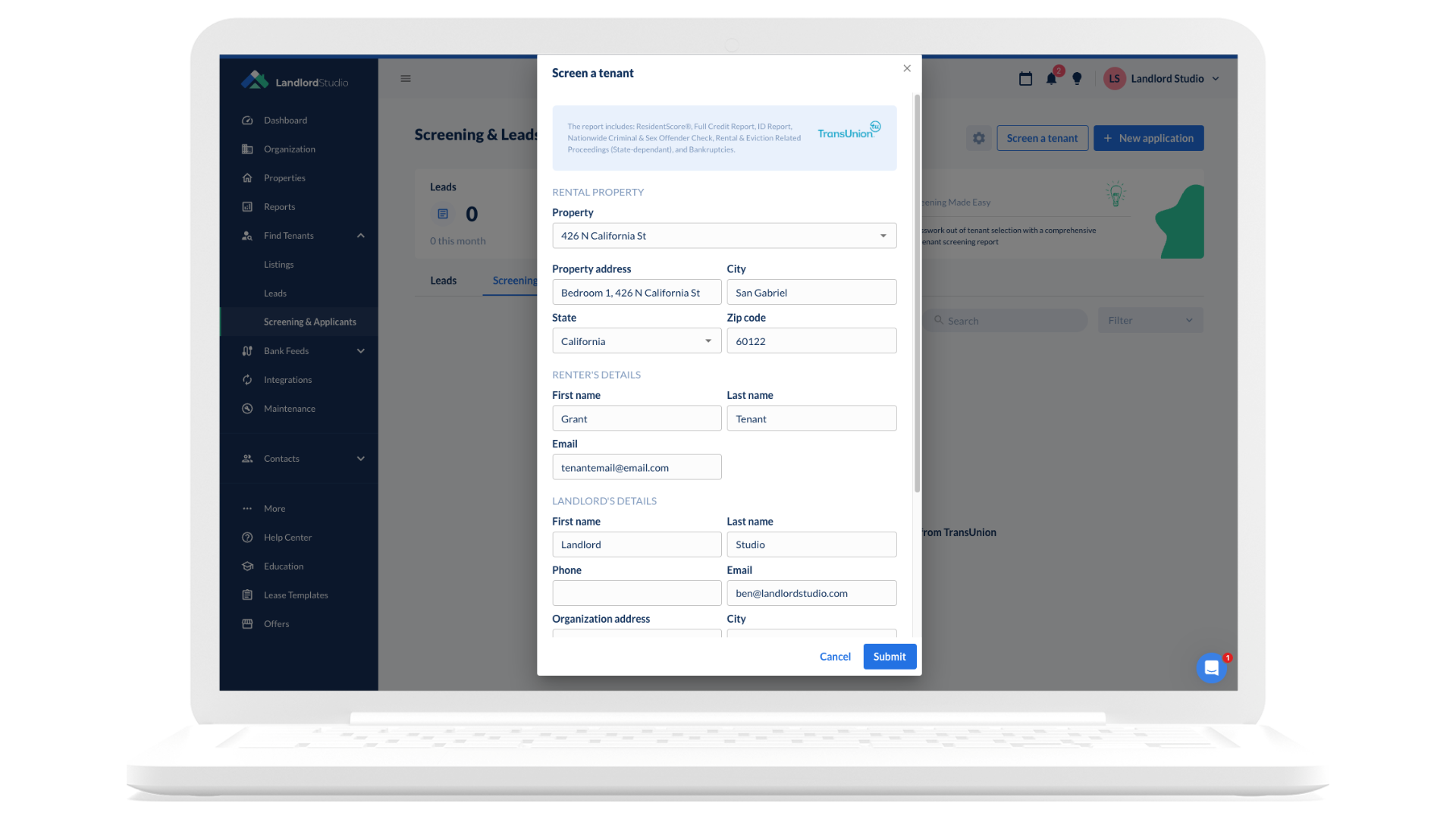
With Landlord Studio, you can initiate a TransUnion SmartMove screening report at the same time as the online application, allowing you to collect all the information you need up front, so you can streamline the tenant selection process. 

The tenant applicant receives a secure link and approves the screening; no paperwork or sensitive data collection is required.

The report includes:

  • ID verification
  • Credit score and history
  • Criminal background check
  • National eviction records
  • Income insights and fraud indicators

No need to collect SSNs, worry about tenant approvals, or store sensitive information; Landlord Studio handles it all securely and in compliance with the FCRA.

📖 Read: How to Run a Tenant Screening Report Online (Step-by-Step) →

5. Review the Report & Make an Informed Decision

Review the screening report alongside the rental application. Things to look for:

  • Credit score and payment history (Set a minimum credit score)
  • Income vs. rent ratio (Often 2.5-3x the rental amount)
  • Eviction history (Previous evictions increase future eviction risks)
  • Red flags like collections or criminal records (Use this information carefully to avoid potential discrimination claims)

Then ask yourself: Does this tenant meet your criteria for reliability and responsibility?

📖 Read: What’s in a Tenant Screening Report → 

6. Follow Fair Housing & Legal Guidelines

Always follow tenant screening laws to the letter. This means making sure your decision is based on objective, legal criteria. Only charging an allowable rental application fee.

And, if you deny a tenant based on the screening report, you must send an Adverse Action Notice. 

You can download Landlord Studio’s free Adverse Action template here.

7. Approve the Right Tenant and Move Forward with the Lease

Once you’ve selected your tenant:

  • Send a lease agreement
  • Collect a security deposit and the first month’s rent
  • Store all documentation securely in Landlord Studio

Your tenant screening process is complete, and your rental is in good hands.

Landlord Studio: Your End-to-End Tenant Screening Solution

With Landlord Studio, you can:

  • Collect rental applications online
  • Run TransUnion SmartMove reports
  • Track communications and store documents
  • Stay legally compliant
  • Find quality tenants faster

Ready to simplify your rental process and reduce risk?

Screen tenants for free
Previous
Up next:  
Chapter 1: What is Tenant Screening

Get started with
Landlord Studio now.

Start for free
Contact Us
help@landlordstudio.com(270) 671 9733
FEATURES
Find tenantsTenant screeningCollect rentProperty maintenanceRental accountingTax reportingElectronic signatures
RESOURCES
Watch a demoHelp centerBlogWebinarsLandlord templatesCalculatorsLandlord laws by stateResourcesUniversity
About Us
Our storyContact usCareersFacebook groupFeature request
COMPARE
AppFolio
Avail
Baselane
Buildium
Doorloop
Freshbooks
Hemlane
Landlordy
Quickbooks
Landlord Studio Logo without Text
Copyright 2026 Landlord Studio. All rights reserved.
Privacy PolicyTerms & ConditionsCookies
Facebook IconInstagram logoTwitter IconLinkedIn IconYouTube Icon
Xero LogoGoogle Play badge App store download badge